
Google Maps Scraper Kit Review (2026): Fast, Free, One Catch
Independent Google Maps Scraper Kit review: 3 real searches against a hosted scraper. Fast, free, and one silent catch that empties the email column.
Posted by
EElkeRelated reading
Yelp Scraper: The API Now Costs $229/Month
Yelp's free API tier is gone — plans start at $229/mo and reviews come as excerpts. What a Yelp scraper can and can't do, and when Google Maps is cheaper.
Yellow Pages Scraper: 20M Listings, One Big Catch
Yellow Pages still has 20M US listings and scrapes easily. How to do it, the data quality problems to expect, and when Google Maps is the better source.
Google Maps Lead Extractor: 200 Leads in 30 Sec
Compare 6 Google Maps lead extractor tools by speed, cost, and email coverage. Free Chrome extensions vs dedicated scrapers delivering 200+ leads in 30 seconds.
Google Maps Scraper Kit went from zero to more than 2,000 GitHub stars in four months, and its own documentation makes an honest admission: no independent benchmark of open-source Google Maps scrapers exists. So we ran one.
We installed the kit from scratch on a Mac, ran three real lead-generation searches, and ran the same three searches through GMapsScraper, the hosted scraper we build. The kit was faster, returned a field we don't, and costs nothing. It also returned zero emails on our machine without printing a single warning — and the reason applies to a lot of people who will install it.
This Google Maps Scraper Kit review covers what it is, what installing it actually involves, the numbers from all six runs, that catch and how to check for it, and who should use the kit versus a hosted tool. We sell the hosted tool, so we have tried to give the kit every point it earned.
What Is Google Maps Scraper Kit?
Google Maps Scraper Kit is a free, MIT-licensed Python project that scrapes Google Maps for lead generation on your own computer. You give it a business type and a city; it returns a CSV with name, phone, website, category, address, rating and review count, then visits each business website for emails and Instagram, Facebook, LinkedIn, TikTok, YouTube and X links.
What makes it different from older scrapers
- Standard library only. No pip install for the basic crawl — Python 3.9+ and a Chrome you already have.
- Emails and socials on by default, where most open-source scrapers leave them out or behind a flag.
- A grid mode (--grid, --deep-scan) to get past Google's cap of roughly 120 results per search.
- An agent skill so Claude Code, Codex or Cursor can run the scrape from a plain-English request.
The project is actively maintained — the version we tested, commit 15dd80b, landed on 2 November 2026 — and funded partly by sponsors, a residential proxy provider and a Google Maps API vendor, disclosed in the README.
How We Tested Google Maps Scraper Kit
Everything ran on 5 November 2026. The kit ran on an Apple Silicon Mac with Homebrew Python 3.14 and the installed Google Chrome. Each search used the README's own pattern: scrape.py "dentists in Denver CO" --city "Denver, CO" --depth 5, which loads about 100 places from the city centre.
On the GMapsScraper side we used Area Search, which runs five sub-searches across the city and returns a comparable 80–120 businesses, then sent every website through our enrichment endpoint for emails and social links. The three searches:
- Dentists in Denver, CO
- Roofers in Phoenix, AZ
- Restaurants in Manhattan, NY
The kit runs searches one after another; we submitted the three GMapsScraper jobs at the same time, as an API user would. Times are wall-clock from start to finished CSV.
Installing Google Maps Scraper Kit: What Actually Happened
The README promises four lines from a clean terminal to a lead list, and that is close to the truth. Cloning took three seconds. Starting the engine with python3 scripts/engine.py start found the installed Chrome and came up immediately.
The one snag: port 8080
Our first start failed because another app on the machine already listened on port 8080 — common on any computer that runs local dev tools. The error message was exemplary: it named the problem, told us how to see what held the port, and gave the fix. Copying .env.example to .env and setting SCRAPER_PORT=8081 solved it, and the scrape script picked up the new port automatically.
What a non-developer will run into
None of this is hard for anyone who uses a terminal. For the sales and agency people who make up most of the audience for Google Maps lead lists, it is a real barrier: Python has to be installed and on the path (on Windows the command is py, not python3), the engine has to be running before every session, and errors arrive as terminal text. The kit also ships a small web form at localhost, which helps once the engine is up.
Google Maps Scraper Kit Results: Speed and Data
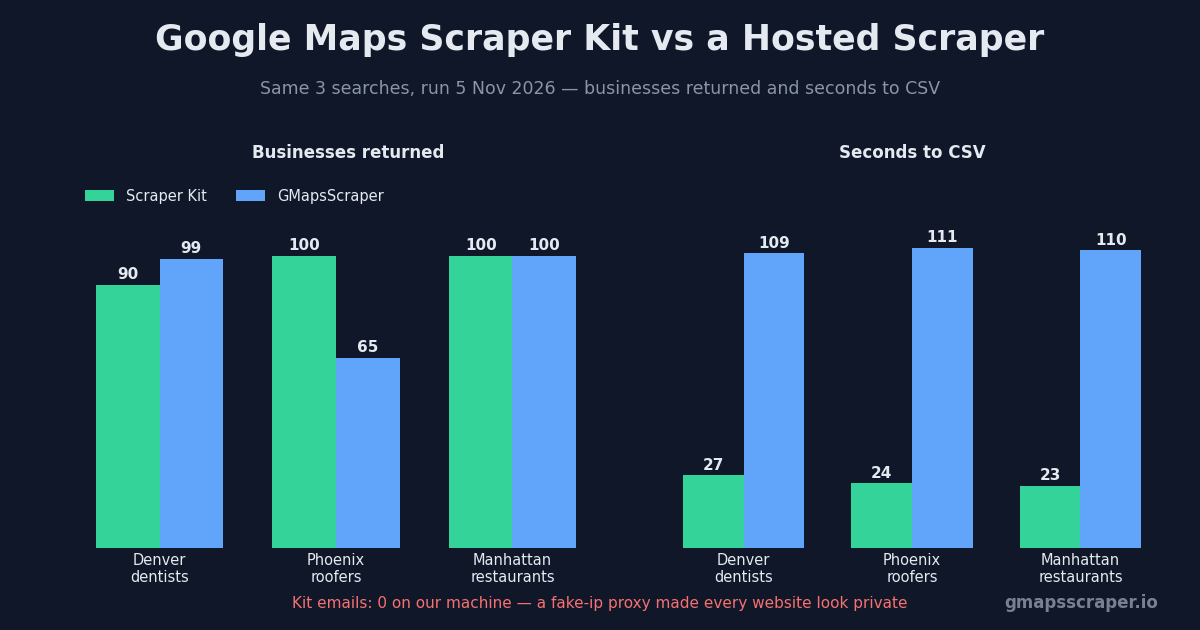
On scraping Google Maps itself, the kit is excellent. Each search finished in 23 to 27 seconds and returned 90 to 100 businesses. Those times include an email step that, as explained below, skipped every website on our machine; the author's Denver run with emails working took 44 seconds. Our Area Search jobs took about 110 seconds each for 65 to 100 businesses, plus 21 to 30 seconds to crawl the websites — several times slower either way, partly because each one queues five sub-searches and merges them, and we ran all three at once.
GOOGLE MAPS SCRAPER KIT VS GMAPSSCRAPER — SAME THREE SEARCHES
Dentists in Denver
Roofers in Phoenix
Restaurants in Manhattan
Businesses returned and wall time to the CSV. The kit's time includes its email step, which skipped every site on our machine (the author's Denver run with emails took 44 s); GMapsScraper's excludes enrichment (+21–30 s). Kit at depth 5 from the city centre; GMapsScraper Area Search (5 anchors, 10 credits), three jobs submitted together.
Field coverage favoured the kit too. Every one of its 290 rows had a category and a review count, and 97.6% had a website. Our fast-mode exports left the category column blank on all 264 rows — a gap this test exposed — and carried a website for 86.7%, with Manhattan restaurants the weakest at 79 of 100.
FIELD COVERAGE ACROSS ALL THREE SEARCHES
| Field | Google Maps Scraper Kit (290 rows) | GMapsScraper (264 rows) |
|---|---|---|
| Phone | 99.7% (289) | 98.9% (261) |
| Website | 97.6% (283) | 86.7% (229) |
| Category | 100% (290) | 0% — fast mode leaves it blank |
| Review count | 100% (290) | 98.5% (260) |
| Emails | 0% on our machine (see below); author reports 42 of 100 for Denver dentists | 114 businesses — 50% of the 229 sites crawled |
| Social profiles | 0% on our machine; author reports 63 of 100 | 135 businesses — 59% of the 229 sites crawled |
Email and social rates for GMapsScraper are per website crawled. The kit's author figures come from the project's own benchmark page, not from our run.
The Catch: Google Maps Scraper Kit Returned Zero Emails
Then the email step finished: “emails found for 0/90 businesses (0%)”. Same for socials. Same for all three searches — 290 businesses, 283 websites, not one email or social profile. The kit's own published run of the identical Denver dentist search found 42 emails and 63 social profiles out of 100, so something on our side was wrong.
What was actually happening
Before the kit fetches a business website, it resolves the domain and refuses to connect unless every address is public. That is a sensible security measure: a Google Maps listing is third-party data, and without the check a listing could point the crawler at your router or the kit's own engine.
Our machine runs Clash, a proxy client, in fake-ip mode. In that mode the proxy answers every DNS lookup with a placeholder address from the reserved 198.18.0.0/15 range and routes the real connection itself. The kit saw thedenverdentists.com → 198.18.22.200, judged it non-public, and skipped the site. Then the next one. The code returns an empty page on any failure, so the run ended with a clean-looking CSV and an empty email column.
THE CATCH: WHY EVERY EMAIL CAME BACK EMPTY
1
Kit asks DNS for the business website
thedenverdentists.com
2
A proxy in fake-ip mode (Clash, here) answers
198.18.22.200
3
Kit's safety check sees a non-public address
198.18.0.0/15 is reserved, not internet
4
Site skipped without an error
"emails found for 0/90 businesses (0%)"
The check exists to stop a listing from pointing the crawler at your router or localhost. It is the right design; the silence is the problem.
How to check whether it affects you
If you run Clash or any other proxy client with a fake-ip DNS mode, run this before trusting an empty email column:
python3 -c "import socket; print(socket.getaddrinfo('example.com', 443)[0][4][0])"An address starting with 198.18. or 198.19. means fake-ip is on and the kit will skip every website. Switch the proxy to a mode that returns real addresses, or pause it for the length of the run, and the email and social steps work as documented. We did not re-run with the proxy off, so the email figures in this review for the kit are the author's, from the project's benchmark page, and labelled as such.
Why this matters beyond one machine
Fake-ip mode is common in Clash-based proxy clients, which many developers leave running all day without thinking about DNS. Anyone in that position gets a lead list that looks complete and silently isn't. A one-line warning when most sites resolve to a reserved range would fix the experience; until then, check the email column count before you build a campaign on it.
Same Search, Different Businesses
The most useful finding had nothing to do with either tool's quality. For the same query, the kit and GMapsScraper agreed on only 10 to 34 businesses.
SAME QUERY, DIFFERENT BUSINESSES — HOW MANY BOTH TOOLS FOUND
Dentists in Denver
20
found by both
169 unique businesses between them — one search saw at most 59%
Roofers in Phoenix
34
found by both
131 unique businesses between them — one search saw at most 76%
Restaurants in Manhattan
10
found by both
190 unique businesses between them — one search saw at most 53%
Matched on normalised business name. The kit scrolled from the city centre; Area Search sampled five points about 24 km apart.
The reason is geography. At depth 5 the kit scrolls Google's results outward from one point — the city centre — until it has about 100 places. Area Search samples five points roughly 24 km apart and merges what each returns. Both are legitimate readings of “restaurants in Manhattan”, and both see a slice of a city that has thousands.
The lesson for anyone building a lead list: no single Google Maps search covers a city, whichever tool runs it. With Google Maps Scraper Kit, use --grid 3 or --deep-scan — the author's Manhattan grid run returned 471 unique restaurants instead of 119. With a hosted tool, use its area or multi-city mode. Our bulk keywords generator builds the neighbourhood-by-neighbourhood queries either way.
Google Maps Scraper Kit vs a Hosted Scraper
Put side by side, the two approaches trade the same things every self-hosted and hosted tool trades: money and speed against setup and responsibility.
GOOGLE MAPS SCRAPER KIT OR A HOSTED SCRAPER?
| Google Maps Scraper Kit | GMapsScraper | |
|---|---|---|
| Price | Free, MIT licence | Credits — Area Search is 10 per run; 5 free searches |
| Setup | Python 3.9+, Chrome, a terminal, a free port | None — browser or API |
| Speed per ~100 businesses | 23–27 s (44 s with emails, per author) | ~110 s + 21–30 s for emails |
| Category field | Yes | Not in fast mode |
| Emails and socials | Built in, unless a fake-ip proxy silently blocks it | Built in via /enrich |
| Whose IP hits Google | Yours | Ours |
| Runs while your laptop sleeps | No | Yes — API, batch queue |
| AI agent support | Claude Code, Codex, Cursor skill | API, SDKs, agent skills |
Where Google Maps Scraper Kit wins
- It is free, and the code is yours to read and change.
- It was several times faster per search in our test and returned a category for every row.
- Data never leaves your machine.
- The agent skill makes it a natural fit if you already live in Claude Code or Cursor.
Where a hosted scraper wins
- Nothing to install, keep running or troubleshoot.
- Google sees the provider's infrastructure, not your home or office IP — which matters once you scrape thousands of places a week.
- Jobs run while your laptop is closed, and an API lets other systems queue them.
- No local network setup — a proxy or VPN on your machine cannot quietly empty your email column.
Who Should Use Google Maps Scraper Kit
Use the kit if you are comfortable in a terminal, want lists occasionally rather than continuously, and prefer free over convenient. It is the best open-source option we have seen for lead lists with contact data, and its documentation is unusually honest about its limits.
Skip it, or keep it as a backup, if you do not use a terminal, if your team needs the same lists without everyone installing Python, if you run outreach at a volume where your own IP becomes a concern, or if you rely on a fake-ip proxy and do not want to toggle it for every run. That is the gap a hosted tool like our free Google Maps scraper is built for.
Using Google Maps Scraper Kit With Claude Code
The repository includes a Claude Code skill and slash commands; the README says the agent checks the engine, starts it if needed, runs the scrape in the background and hands back a table plus the CSV. Codex, Cursor and other Agent Skills tools use the same skill. We ran the kit from the terminal for repeatable timings and did not test the agent route, so we can only report what the documentation describes.
The fake-ip caveat applies equally there: the agent runs the same script, so it would report the same empty email column.
Is Google Maps Scraper Kit Safe to Run?
On the evidence of its code and configuration, it is carefully built. The engine listens on localhost only and rejects requests whose host or origin is not localhost, the website crawler refuses private addresses (the check behind our zero-email result), and the README discloses its sponsors. We read the crawler and networking code, not every file, before running it; with any code from GitHub, that is the minimum.
Legally, a local scraper and a hosted one raise the same questions about Google's terms and about how you use the contact data afterwards. Our guide to whether scraping Google Maps is legal covers both.
Frequently Asked Questions
Is Google Maps Scraper Kit free?
Yes. It is open source under the MIT licence, needs no API key and has no paid tier. Your costs are your own machine, your own IP address and, at scale, possibly a proxy.
Why does Google Maps Scraper Kit find no emails?
On our machine, because a proxy in fake-ip mode made every website resolve to a reserved address, which the kit refuses to contact. Check with the one-line command above. Without that, the author's published runs found emails for roughly 25–65% of businesses depending on the niche.
How many results does it return per search?
About 20 per depth step, up to Google's cap of roughly 120 per search. Grid and deep-scan modes split the area into tiles to go further.
Does Google Maps Scraper Kit work on Windows?
The project supports Windows, Linux and Docker; on Windows you type py instead of python3. We tested on macOS only.
Is it better than gosom/google-maps-scraper?
Different, by its own account: the kit returns emails and social profiles by default and needs no Docker; gosom is the stronger choice for distributed crawls into PostgreSQL or hundreds of reviews per place. Our comparison of the best Google Maps scrapers covers the paid options too.
Verdict
Google Maps Scraper Kit deserves its stars. It is fast, free, well documented, and returned more complete listing data than we did in this test. Its one real flaw is a silent one: on a machine with a fake-ip proxy it hands you a lead list with no emails and no warning. Check the email column, and if you would rather not install or babysit anything, a hosted scraper does the same job from the browser.
Try GMapsScraper free — five searches, no install — or get the kit on GitHub and run the check above first.